
Acrylic Nails Makeover Salon
Genius Unicorn Girls GamesBeauty
0.00.00 Reviews
- Version
- 1.9
- Installs
- 10.00K
- Age Rating
- Everyone
Screenshots
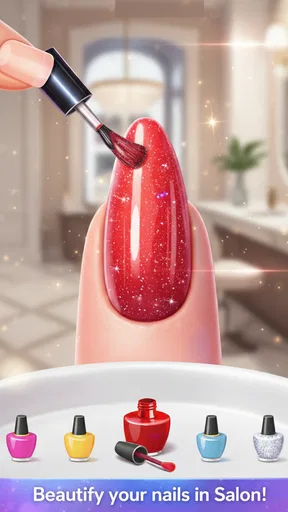
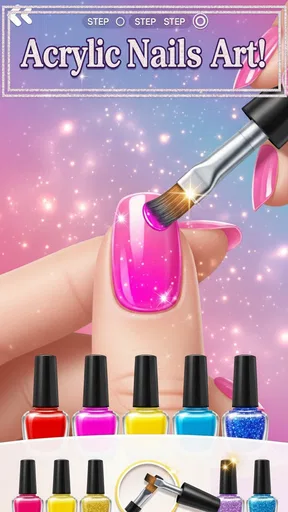

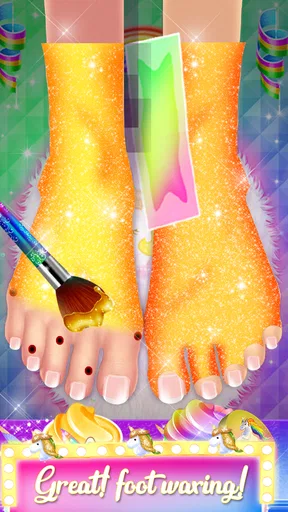




Our Review of Acrylic Nails Makeover Salon
 Analysis by Appyee
I spent time with Acrylic Nails Makeover Salon as a light beauty app rather than a serious nail-design tool, and that distinction matters. It is built around a cute salon experience where I could focus on manicure and pedicure styling, polish choices, and the playful rhythm of completing salon levels. The presentation is aimed at casual use, so I found it much easier to pick up for a few minutes than to treat as a deep simulation.
The app comes from Genius Unicorn Girls Games and is free to use. It sits in the beauty category, carries an Everyone age rating, and is suitable for someone looking for colorful, uncomplicated nail-art play. Its store summary points to a little kitty theme, fashion-focused nail art, and salon levels, while the short store description calls it an acrylic nails salon experience. In practice, I would describe it as a child-friendly makeover game with a strong emphasis on visual choices and simple interaction.
What makes it appealing is not realism. It is the small sense of transformation: starting with an ordinary-looking hand or foot, working through a salon routine, and ending with something brighter and more decorative. I can imagine recommending it to a younger player, a casual beauty-game fan, or anyone who enjoys dress-up apps but wants the focus moved from clothing to nails.
How the salon experience feels in everyday use
I find this salon game easiest to enjoy when I treat it as a short, shared creative break rather than a project that needs a perfect finish. Before starting, I’d decide whether the player wants to explore colors independently or build a look together; that small choice makes the session feel less rushed. From there, the next useful question is how its simple salon flow guides those decisions.
A simple flow that works well for short sessions
The most natural way to play is in short bursts. I can open the app, choose a salon activity, make a few visual decisions, and stop without needing to remember a complicated story or a large collection of rules. That makes it a good fit for a quiet break, a waiting-room moment, or a child who wants something more interactive than simply looking at nail designs.
The salon structure gives the experience a little direction. Instead of presenting an empty canvas and expecting me to invent everything, it frames the activity as a sequence of makeover tasks. That is helpful for younger users because each step feels understandable. It also reduces the intimidation that can come with creative apps that offer too many choices at once.
I particularly liked the way the app turns ordinary grooming actions into playful progress. A manicure or pedicure is familiar enough to understand immediately, but the fashion-art angle makes it feel like a small performance. The kitty styling adds personality without requiring the player to learn a complicated character system.
Where creativity is encouraged, and where it is limited
The strongest creative element is the combination of polish and decorative styling. I could think about color matching, whether a design should look soft or bold, and how the finished nails fit the overall salon mood. This is not the same as using a professional design editor, but it does give children a safe way to experiment with visual combinations.
There is also a useful lesson in the app’s simplicity: a limited decision can be more enjoyable than an oversized menu. A younger player can try a bright color, compare it with a quieter choice, and learn how contrast changes the appearance. I found that letting a child choose the base color first, then discussing which decorations complement it, turns a very simple activity into a small creative exercise.
On the other hand, anyone expecting detailed nail anatomy, realistic acrylic application, or professional salon technique should adjust their expectations. The word “acrylic” may suggest a practical tutorial, but this is entertainment first. It does not replace a real nail-art lesson, and it should not be chosen as a training tool for someone who wants to learn safe product handling or salon hygiene.
Three useful ways to get more from the app
My first tip is to treat each level as a color-planning exercise rather than tapping through as quickly as possible. Pick a main shade, decide whether the decoration should contrast or blend, and only then complete the look. This makes the experience feel more personal and helps prevent every design from becoming visually similar.
My second tip is to use it as a conversation starter with children. Ask why a certain polish suits the kitty theme, what would make the design more suitable for a party, or how the same nails could look calmer. The app does not need to provide a formal learning mode to support this kind of guided play; the visual choices are enough to encourage simple reasoning about style.
My third tip is to use the pedicure and manicure activities differently. A manicure can be approached as a detailed fashion choice because the hand is usually the focus, while a pedicure can be treated as a coordinated companion design. Matching everything exactly is not always the most interesting result. Letting the two styles share one color while using different decoration creates a more deliberate makeover.
What happens when the phone is not in an ideal setting
The app is best suited to a stable, ordinary mobile session. If I am using it while moving between places, the main challenge is not the salon interaction itself but the surrounding conditions of mobile use. A small screen makes decorative choices easier to miss than they would be on a tablet, and interruptions can make a short level feel less smooth.
That is why I would hand it to a child when the device is settled on a table rather than during a car journey or while walking around. The experience benefits from being able to see the nail area clearly and make deliberate taps. It is casual, but it is still more enjoyable when the player is not fighting glare, motion, or a crowded screen.
It also works well as a shared activity on a family phone. One person can choose the general style while another decides on the finishing details. That approach is especially useful for younger children who may enjoy the choices but need help navigating a small interface. The app’s straightforward beauty theme makes it easy for a parent or older sibling to join without needing to understand a backstory.
Connectivity and the moments that deserve attention
Connectivity shapes the experience mainly around the practical act of using a mobile app. I would not plan a session around assumptions about network behavior, because the salon activity should be judged by what is visible and responsive on the device at that moment. If a screen takes longer to appear or an interruption occurs, the best approach is to pause rather than repeatedly tap through the interface.
This matters particularly for children. Repeated tapping during a delay can lead to accidental selections, while closing and reopening too quickly can make it harder to know whether the previous action registered. A calmer routine works better: wait briefly, check whether the current salon screen has responded, and then continue with one tap at a time.
I also recommend starting the app before handing the phone to a child. That small habit avoids turning a planned creative session into a troubleshooting exercise. It gives the adult a chance to confirm that the app opens normally and that the device is ready, without making any claim about whether every part of the experience works without a connection.
Recovery after interruptions or a failed session
Mobile apps can be interrupted by calls, notifications, low memory, or a user accidentally leaving the screen. With this kind of level-based salon activity, recovery is less stressful when the player has not rushed through the design. I found it sensible to finish one small task before switching apps instead of leaving the game halfway through a selection.
If the app stops responding, I would first avoid tapping repeatedly. Return to the app once, give the screen a moment, and check whether the current activity has recovered. If that does not help, closing and reopening the app is the practical next step. Because the experience is designed for casual play, restarting a short session is less frustrating than losing progress in a long strategy or role-playing game.
The more important limitation is emotional rather than technical: a child may feel that a carefully chosen design has been wasted if an interruption occurs before the level finishes. For that reason, I would introduce the app as a quick creative activity, not as a task that must produce a permanent collection of finished work. That expectation keeps occasional interruptions from becoming a major disappointment.
Using it carefully on a shared or limited mobile plan
Since the app is free, it is easy to try without making a purchase decision first. Still, free does not automatically mean frictionless in every mobile environment. On a shared family device, I would let an adult handle the initial setup and review the app’s current behavior before giving it to a child. That is a sensible habit for any children’s app, especially one that may be used by someone who taps quickly.
Data-conscious users should also avoid assuming that every screen behaves the same way in every situation. If a family is trying to reduce mobile data use, the safest routine is to open and test the app under the household’s preferred connection, then observe whether any part of the experience behaves differently when the connection changes. I would not promise offline play without checking the current installation directly.
Battery use is another everyday consideration, although this is not the sort of app I would choose for a long continuous session. Its appeal comes from brief visual activities, so it fits better into a short break than an extended gaming marathon. Keeping sessions short also helps the phone remain available for calls, schoolwork, navigation, or other more important tasks.
Who will enjoy it most
I think the best audience is younger players who already like makeover themes, colorful fashion choices, and cute characters. The Everyone rating supports that broad, family-friendly positioning. It is also a reasonable pick for adults who want a relaxing, low-pressure beauty game, provided they are comfortable with a simple experience rather than a detailed creative studio.
Parents may appreciate that the concept is easy to understand. There is no need to explain a complicated objective before a child can begin experimenting with polish and salon styling. A parent can also turn the app into a short, supervised activity by asking the child to describe the look before completing it.
I would skip it if the goal is professional nail education, realistic acrylic technique, advanced customization, or a robust design archive. Someone who wants to save polished work, compare many intricate patterns, or practice real-world salon procedures would be better served by a specialized design or tutorial app. This title is strongest when the goal is playful transformation, not technical accuracy.
How it compares with other beauty apps
Compared with dress-up games, this experience feels narrower but more focused. A dress-up title usually spreads attention across hair, clothing, accessories, and character presentation. Here, the nail salon theme gives the player a smaller creative space, which can be an advantage for a child who finds broad makeover menus overwhelming.
Compared with professional nail-design tools, it is much more approachable and much less precise. A design tool may offer better control over shapes, layers, or detailed patterns, but it can also feel like work. This app trades that control for a friendlier flow and a more immediate sense of completing a salon level.
Compared with realistic simulation games, it also avoids much of the pressure. I did not approach it as a test of business management or customer satisfaction. The focus remains on the visual makeover itself. That makes it easier to recommend for casual play, but it also means that players looking for strategy, time management, or realistic client decisions may find the experience too light.
Device compatibility and what the release details mean
The app requires Android 6.0 or later, so it is aimed at a wide range of Android devices that are not running very old software. I would still expect the clearest experience on a phone or tablet with enough screen space to distinguish small nail-art details. On a compact or older device, the basic play should be easier to follow than the finer visual choices.
The current version is 1.9, and the app was released on October 14, 2021. Those details place it in the category of established casual apps rather than a brand-new release. The developer is Genius Unicorn Girls Games, a name associated here with the child-friendly beauty-game approach. The app has passed around ten thousand installs, which suggests that it has found a modest audience without making it a mainstream platform.
Because it is free, the main decision is not whether the price is justified but whether the style matches the player. I would install it for a child who wants a cute nail salon activity, then spend a few minutes checking the controls and presentation before deciding whether it deserves a regular place on the device.
My final view on the connected salon experience
I came away seeing Acrylic Nails Makeover Salon as a pleasant, narrowly focused beauty game. Its value is in the immediate visual payoff: choose a style, work through a salon activity, and enjoy the finished nails. The kitty theme and level structure make the idea approachable, while the manicure and pedicure focus gives it a clearer identity than a general makeover app.
Its limitations are equally clear. It is not a realistic acrylic tutorial, not a professional design workspace, and not the right choice for someone demanding deep progression. Connectivity and interruptions are best handled with modest expectations and a prepared session, especially when a child is using a shared phone. I would start the app before play, avoid rushing through delayed screens, and keep sessions short enough that a restart would not feel costly.
For the right person, that is enough. If you want a free, Everyone-rated Android beauty app for casual nail-art play, this is an easy one to understand and recommend. Its strongest feature is the low-pressure makeover loop: it invites experimentation without asking the player to master a complicated system. I would choose something else for serious nail design, but for a quick, colorful salon activity, it does its job well.
Verdict
Strengths of Acrylic Nails Makeover Salon
- Fun makeover gameplay with many nail design options.
- Easy controls suitable for casual players of all ages.
- Creative color, pattern, and decoration combinations.
- Short levels make it convenient for quick play sessions.
- Bright visuals and salon theme create an engaging atmosphere.
Limitations of Acrylic Nails Makeover Salon
- Some designs and decorations may require watching ads or paying.
- Gameplay can become repetitive after completing several makeovers.
- Frequent advertisements may interrupt the salon experience.
- Limited challenge may not satisfy players seeking strategic gameplay.
- Performance can vary on older phones or low-end tablets.
Similar Picks in This Category
View All
Beauty Makeup Editor & Camera
Photo & Video Editors - Instant Solution4.7

Perfect365: Face Makeup Editor
Perfect365, Inc.3.5

Mirror Plus - HD Mirror app
Digitalchemy, LLC4.8

Cute Lock Screen & Wallpapers
Prometheus Interactive LLC4.6

HD Camera for Android
One Music Player4.5

Phone Mirror app - True Mirror
Cards4.6
Frequently Asked Questions
What is Acrylic Nails Makeover Salon?
Acrylic Nails Makeover Salon is a casual beauty and makeover game focused on designing stylish manicures. Players can prepare nails, choose shapes and lengths, apply acrylic colors, add patterns, and finish the look with decorations such as gems or stickers. It is designed for relaxed, creative play and does not require professional nail-art knowledge to understand the basic tools.
How do you play Acrylic Nails Makeover Salon?
Gameplay generally follows the steps of a virtual manicure. You select or prepare a client’s nails, trim and shape them, apply acrylic material, choose polish colors, and decorate the finished design. The controls are usually based on taps, swipes, and selecting items from menus. Each stage is straightforward, although some designs may require careful movements to achieve a cleaner result.
Is Acrylic Nails Makeover Salon suitable for children?
The game is generally suitable for children and anyone who enjoys simple fashion or makeover activities. Its colorful presentation and easy touch controls make it accessible, while the nail-focused theme encourages creativity rather than complex strategy. Parents should still review the app’s age rating, advertising, and in-app purchase settings, since these details can vary depending on the Android or iOS version.
Does Acrylic Nails Makeover Salon require an internet connection?
Basic nail-design activities may work without a continuous internet connection, which is convenient when playing while traveling or when mobile data is unavailable. However, certain features can depend on connectivity, including advertisements, optional rewards, updates, or promotional content. For the most reliable experience, install the latest version and check the store listing or the game’s own settings for current offline limitations.
Is Acrylic Nails Makeover Salon free to download?
Acrylic Nails Makeover Salon may be available as a free download, but free access can include advertisements, locked designs, or optional in-app purchases. Some tools, colors, decorations, or extra content may require watching ads or making a payment. Before downloading, check the official Google Play or App Store listing for the current pricing model and confirm that purchase restrictions are enabled if children will use the app.
